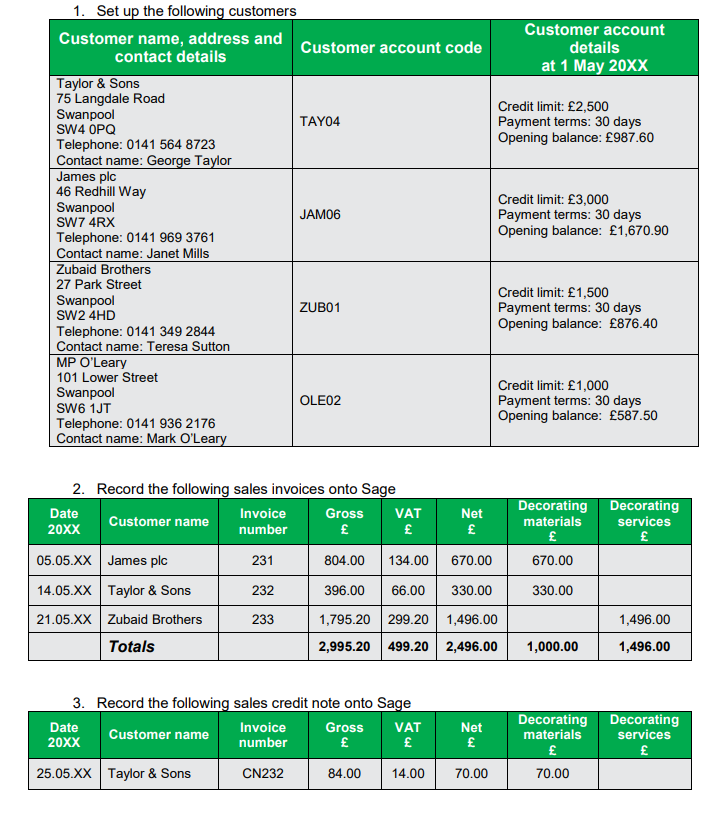
The company’s services or products are sold to its customers. These customers
have to be set up on Sage in order to be able to allocate invoices, credit notes and
transactions against the customer.
In order to set up customers, click on the ‘New’ button at the top of the Sales Ledger
(Customer tab), and follow the wizard.
Important! watch out for the below mistakes students commonly make
When setting up customers, pay close attention to the following:
• Enter the customer code at the start (called A/C Ref on Sage)
• Make sure to enter the correct Credit Limit and payment terms if provided.
• When entering an Opening Balance, make sure the date and amount are
correct, and make sure to enter the Opening Balance as an ‘Invoice’, not
a ‘Credit’. To help you remember, your customers typically owe you money
for an invoice
In the Sales Ledger (Customer tab) you can complete the following functions:
• Enter in a Sales Invoice to record that a customer owes you a certain amount
of money for a particular service/good you sold them.
• Enter in a Sales Credit Note to record that a customer returned some goods
or complained about a service, and it reduces the balance your customer
owes you. (Note: Credit Notes have the opposite effect to invoices).
• Generate a Customer Statement to send to your customer – This is a financial
document sent to the customer indicating what is owed. Sending your
customers statements on a regular basis is a good way of keeping them
informed, and it can also gently remind them that their payments are due or
overdue.
• Generate a Letter to send to your customer.
• Generate a number of Reports.
Exercises